Classification of Software

Last few weeks we finished our flowchart poster presentation and learnt a lot about software. We leant its hierarchy, we defined it, and we leant different types of software (mainly categorize to system software and application software). Some interesting activities were done, too: watching videos about library softwares and translators, and in pair discussing about utility software. I heard a lot about software before but I do not know its true meaning until I finished these classes. I found software pretty interesting!

Flowchart poster

We were divided into pairs randomly to create a scenario using flowchart and pseudocode. I was with Adam and our scenario is about how to review for final exam. It is a really easy algorithm and is very useful, as it can be used not only for this semester’s final exam, but also for future final exams.

In our algorithm, we ask the user to input today’s date, which we recorded as BEG, and we ask when is the exam, recorded as END. Also there is an output “how many subject you need to prepare?” , and the input is NUM. Then we will calculate the day for one subject, using end-beg/num. For example, the beg is May 20 and the end is June 15th, and you need to review 8 subjects. It is 26/8=3. Then we created a loop to determine the review order. After that it goes to the second round of review.

The core idea of our algorithm is that we have two round of review and we review our most difficult subject first. So it let us to have much subjectivity. No matter how many days are remain and no matter how many subjects you have to prepare, you can use this algorithm to get a plan. Also, this algorithm is pretty simple and doesn’t get into details, because we all know that less is more. We don’t need to spend hours to elaborate a perfect detailed plan.

Software

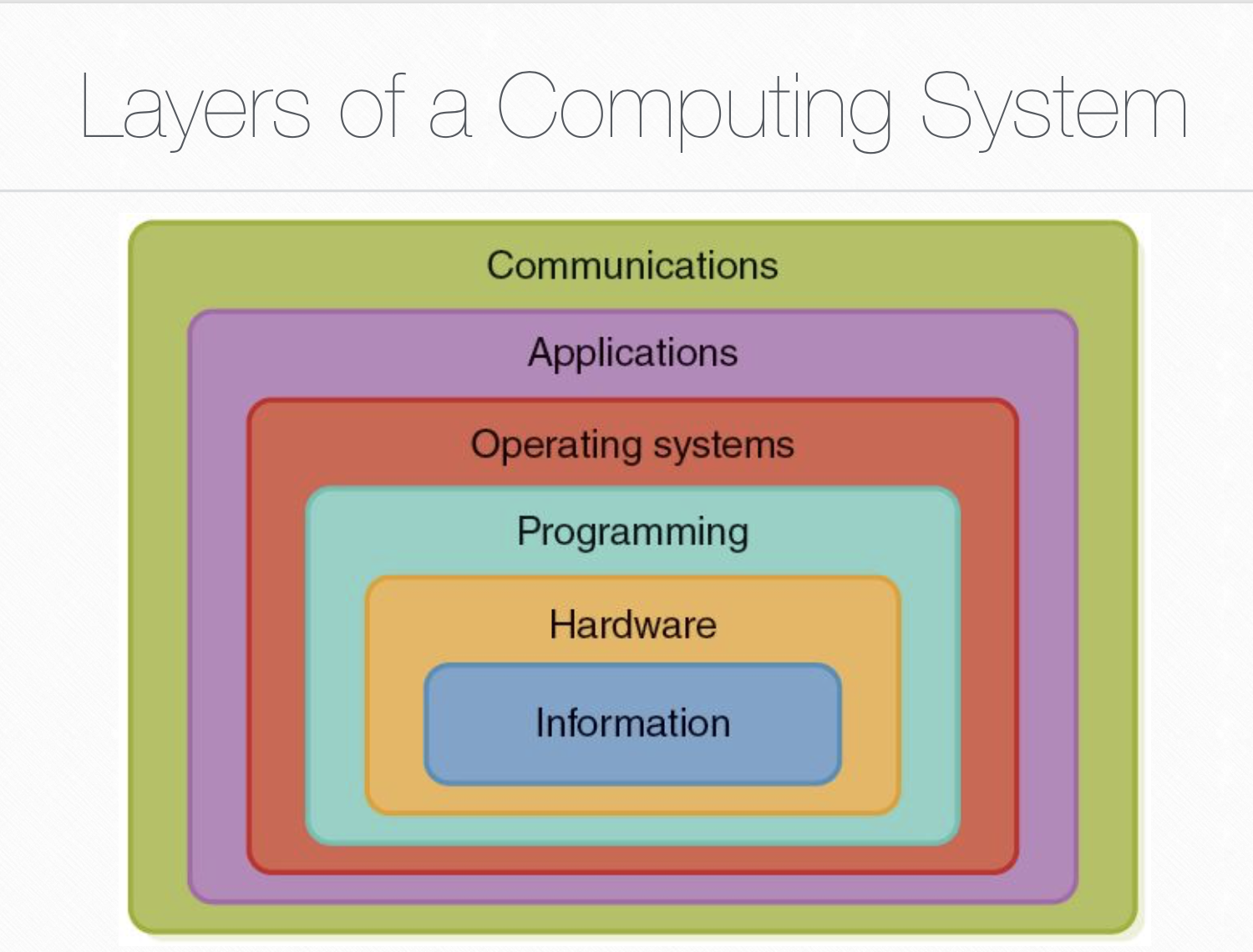
layers of a computing system

First, from the view of layers, we learnt that programming, operating systems, and applications layers are softwares.

software hierarchy

system software

System software is a software designed to operate the computer hardware and to provide a platform for running application software. It contains system management program and developing software.

system management program:
First, it is operating systems, a set of programs that make computer hardware conveniently available to the user. It hides the complexities of the computer’s operation in order to not disturb the user. For example, ios, apple, linux, and windows are all operating systems.

IOS

Second, library programs are also important. It is a set of commpiled routines that other programs can use. Comouter game developers often use graphical libraries to speed up development. We also watched a video about it, and I’m very surprised that designing a computer game include so many steps. We need to create characters( how they look like, how they perform the action and their voices), backgrounds (colors and textures), and story line. Abstract and concrete thinking are involved. After that we need to conduct experiments to find and repair bugs. It can also apply to our daily lives: after we finished our prorams/homeworks/anything, we need to examine it carefully.

Utility softwares are programs that perform a very specific task related to working with computers. They are tiny but powerful programs with a limited capability, and are used to maintain a smooth running of the computer system. I discussed 7-zip with Mr. Shao and we thought it is an untility software. After everybody shared their examples (include virus scanner, desk cleaner, and file managers), I found that 7-zip is an overlap, for it has some specific purposes, too.

Developing software: The most important one is translator software. It is a software that allows new programs to be written and run on computers, by converting source code (java/python/C++) into machine code (binary language).

There are three types: Assembler is a program that translates low level programming language into machine code. We watched an interesitng video to see the difference between compiler and interpreter: Compiler is a program that takes a program in a high-level language and translates it into object code all at once. It is pretty fast and some apps on our phones use it. Interpreter analyses and executes a high-level language program line by line, so it is easy for us to correct mistakes. “Inter” means between the programs and the mechanics.

application software

Application software allows users to perform non-computer tasks. It is a software designed to help the user to perform specific tasks, such as writing a letter or processing orders. It can be further divided into:

General purpose application software

General-purpose software is a type of software that can be used for many different tasks. It is not limited to one particular function. For example: word processors allow us to write articles, make poster, and create tables.

use word to take notes

Special purpose application software

It is a type of software that created to execute one specific task. For example: A camera application on your phone will only allow you to take and share pictures. A chess game would only allow you to play chess.

Bespoke application software

Bespoke software is tailor made for a specific user and purpose. It is the opposite to “off the shelf” (for regular people). For example: BNDS may want a software for students to give their suggestions. Since the software need to consider the conditions in BNDS, it would have to be specially built for the task. Other examples: software for the military operations, software for hospitals and software for banks.

We learn different types of softwares in this week, and for each type we not only defined it but also give specific examples to better understand it. We watched video and discussed in pairs. It is a little bit difficult since we need to memory and distinguish these softwares, but by doing these we can immprove our abstract and concrete skills (there are big and small categories).

Algorithm

Last few weeks we learnt a lot about algorithm. We defined it, leant its properties and studied how to design an algorithm. Some interesting activities were done, too: role playing, magic show, route planning and robot game. I found algorithm so common and important, but it is a little bit difficult for me to memorizing so much things.

Some Basic Information

The first question is obvious: what is an algorithm? After some discussion, we got a perfect definition of it: a set of step-by-step clear instructions to solve a problem in a definite amount of time with the best effeiciency possible.

Then, by sharing some examples, we found out that algorithm has five properties. First, finiteness is important. That means an algorithm must end in a finite number of steps, because we can’t wait for years. Second, definiteness: each step of an algorithm must be precisely defined, so the computer can operate the same way as you expect. What’s more, an algorithm must has input and output. Finally, all of the operations in the algorithm need to be basic enough, so the computer can understand it. Also, people want to save time and space, so algorithms are always very “clever”, that it use the best way to solve a problem. That property is called effectiveness.

ALgorithem is also a critical part of computational thinking, which include decomposition, abstraction, pattern recognition and algorithm.

Algorithem Magic

We were divided into four groups to conduct four magic shows about algorithm. I was with Tiger, Lucy, Elizabeth and Adam, doing Australian Magician’s Dream. Unfortunately, we did the same show as group two. It really gave us a lesson: we should check before we start. Also, I found that gourp two’s presentation involved computational thinking, which I didn’t think about. They related decomposition and abstraction with the magic. I thought we both did a great job.

https://www.youtube.com/watch?v=Xm-7FzVu0YE&feature=youtu.be

This trick is about finding the 16th card, and all we did is divide them into two piles and repeat the process. When group two was explaining, one of them said the total number of the cards chosen should be less than thiry-two. I didn’t think so, because if a magic show has so many uncertainties, it can not be called a magic show. Smart magician can handle situations, for example, if it is more than thirty-two, we can change the card we pick, that’s all.

My part was to expain the link to computer science. The magic show is the exact algorithm for computers to find data. I used sixteen cards which all have binary numbers written at the top, and some holes indicating their numbers. If we want to find sixteen, which is 10000 in binary, we can just use a toothpick respectively pass through the last four zeroes. After the first round, all the odd number cards go, because I shake out all the cards that have one as last number in binary. We keep that and finally only number sixteen remain.

Other groups showed us The Intelligent Piece Of Paper and The Red Black Mind Meld. When Jerry was explaining different situations of the game, I thought he was wrong so I interupped him. But after his explaination, I realized I was wrong. At that moment I was a little embarrased, for I thought I’m not very polite and I’m stupid. I should think deeper before asking. But I also think I gain more by asking this question, for I realized a blind point of my logical deduction.

Other Interesting Activities

Video

We watched an really beneficial video-“The Secret Rules of Modern Living: Algorithms. I’m very surprised that algorithm is everywhere. It is not just a term in computer science, it hinds quietly behind all things and rules our lives. An intersting example of it is a mathematical game, in which there are thirty cards in a box and two players who can only take away 1-3 cards at once. In order to win the game, the beginning person can just take away two cards, and then every round make sure the sum of the card took away is equal to four, so after seven rounds the person will win. Another example is a mathcing algorithm which can apply to marriage assigning, college admission, roomates choosing and so on. As for college admission, the first step is that all students propose their dream school and then the school reject extra students whom they like least according to their principles. After enough rounds there will be a stable outcome.

Role Play

In order to understand algorithm more clearly, we did a human robot role palying. Lucy, acting as a robot, used her coat to cover her eyes so that she can only listen the instructions. Another student give instruction for directions and actions for Lucy to guide her touch a thing. Finally we succeeded but spent a lot of time. That reminds us the property of an algorithm-effectiveness. Next time we can use specific degree like”forty-five degree to your left” to better instruct robots.

Route Planning

Lisa and I worked out a route that starts form the hotel and visits every tourist site exactly once. After we finished, we shared our route with another group, suprisingly found that there is another design with equal efficiency. I found some moral through this activity: most times there are more than one way to achive a goal, and people can’t label them with ‘bad’ or ‘good’. So the one that suits you is the best and we should always be willing to listen to others, because sometimes when we think we are right, they are not wrong, too.

Robot Game

We did a homework about designing the route for a robot to light the squares. The game is on lightbot.com/flash.html. At first, it is pretty easy. Decomposition is really impoortant in designing the route, for we need to light the square one by one so we need to split the problem into small pieces. Then, in order to be more efficient, we are asked to repeat some procudures.

This is a very difficult one

I think smart repetition can also save our time and energy in daily life. For instance, I want to improve my English. Instead of read a short paragraph one day and listen to English songs another day, which require me to think what to do everyday, I can just read an English book. Everyday I can read one chapter and then read it aloud to practice my speaking, so I can get used to it and thus can follow this perfect plan everyday.

Design An Algorithm

We also leant how to design an algorithm. There are two main areas to look at: the big picture (what is the final goal?) and the individual stages (what barriers need to be overcome on the way?)

Understanding the problem is important. We can ask ourselves some questions to help check if we understand the problem thoroughly. For instance: What are the inputs(what do I alrealy have) and outputs(what result do I want) of this problem? What do I need more? What decisions need to be made in the problem? Are any areas of the problem repeated? In what order do instructions need to be carried out? Take brushing teeth as an example. If you do not conduct it in the right order, which means you brush your teeth before putting toothpast on your toothbrush, the effect will not be as good as that of a right order.

Then, we learn four expressions of algorithm. First, it is Natural Language. It means simple english and is always too verbose and ambiguous. Flow Chart, a formalized graphic representation, is another expression of algorithm. Pseudocode is another form. It is a generic artificial language, and has some naming conventions. For example, while means a loop, variable names are all capital, and == means compare. Finally, programming language is also useful. It is an artificial language to communicate with computer system.

An example of flow chart

The magic and wisdom behind algorithm really fancinates me, and I’m a little overwhelmed with so many things: definition, properties, examples, designing and expressions. Really looking forward to new cs knowledge and intriguing class activities!

Inside a Computer and Binary Representation

This week we’ve learnt a lot: what is a binary number system, how does a computer work, as well as ASCII and unicode. Things get more complicated and more innteresting, and we also did some activities to better illustrate these abstract concepts about computers.

Binary number system

First, we learnt binary number system. Computer converts data, which is stored and transmitted as a series of zeros and ones, into information.

I wondered why we only let computers using zeros and ones, for the binary number system need more space than decimalism. By searching on internet, I understood that binary system is easy to achive, since we can let “close the circuit” to be zero and “break the circuit” to be one. What’s more, it is easy to calculate.

So how to convert decimal to binary? First, split the number into the sum of the power of 2. For example, 7=2^2+2^1+2^0. Second, find the length of the binary number. The length is the biggest power plus one. In this case, it’s 2+1=3. Finally, fill the space: fill one on each power+1’s space (counting from right) and then fill the remain space zero. So 7=111. If we want to convert binary to decimal, just plus each 2^(place-1) for every place that contains one. For instance, 111=2^0+2^1+2^2+7.

See the source image

That’s interesting! We also had an activity that five volunteers respectively represented 1, 2, 4, 8, and 16. We counted from 1 to 31 by combinding these numbers. I found the idea of “combinding/rearranging things we already have to form new things/to convey information” really interesting and useful. In our life, for instance, we use English which have only 26 letters. It is so helpful, just because we arrange letters in different ways! We also did a worksheet to practice our skills.

How does a computer work

In order to understand how does a computer work, we fist looked at some important terms: CPU, CU, ALU, Register, and Bus. CPU, the central processing unit, is like the brain of a computer. It is where computers execute instructions form memory. Basically there are four parts in the CPU: CU, ALU, Register and Bus. As for CU, control unit, it makes decisions and sends signals to other parts of the computer. Arithmetic Logic Unit (ALU) is the place to do calculations and it can also deals with logic. Register can store information temporarily. Bus‘s function is to carry information to other parts of the CPU.

Then we watched a cute video in which we all became “electrons” and had a wonderful tour inside of the computer. We surprisingly known that there are so many steps between a click and the final display. Sometimes we ignore and despise little things like these and consider them as “very easy stuff”, but only if we do it oulselves we can find out the truth.

So here is my understanding of how does a computer work: When the computer receives instruction (input) from the user, the CPU begins to execute these information at once. CU get information from memory and send them to ALU and register through bus. Bus also carries infromation from CU to display. Finally we can get our output shown in display.

https://i0.wp.com/www.belpercomputing.com/wp-content/uploads/2015/10/Inside-the-CPU-Diagram.png

We were also divided into groups to experience this, and our group got a strange pattern (it is supposed to be a heart). The error may occur in any of us: CU(me), ALU(Hania), display(Catherine), and I realized in a team we need everybody perform well, otherwise we can’t get a good result.

ASCII and UNICODE

ASCII, American Standard Code for Information Interchange, is a standard that assigns letters, numbers,and other characters in the 256 slots available in the 8-bit code. For example, lowercase i would be represented in the ASCII encoding by binary 01101001.

Unicode is a standard for the consistent encoding, representation, and handling of text expressed in most of the world’s writing systems.

There are many differences between them:

• Unicode is an expedition of Unicode Consortium to encode every possible languages but ASCII only used for frequent American English encoding. For example, ASCII does not use symbol of pound or umlaut.

• Unicode require more space than ASCII.

• ASCII only supports 256 characters while Unicode supports much more characters.

In conclusion, this week we had a glimpse at the inside of our computers: we learnt their language (binary system), how they work and some smart ways letting they work (ASCII and unicode). I had a feeling that some of the students really known a lot about computers and I’m very new to it. Nevermind, I’m sure I will get more fimiliar with my friend–Mr. Computer!

Cici reflection about computing system

In the past one month of CS learning, everyone in class created his/her own blog, and we had a deeper understanding about computing system. I found CS class really interesting and useful!

BLOG

Fisrly, we learnt how to set up an online portfolio: go to https://wordpress.com/ and then just add our information like emails. Then we had our own blogs! Also we leant hot to set up proper categories, menus, and posts attached to the categories.

computing system

In the beginnig, we learnt about the history of computer and I’m really amazed by its fast development. Computer were not invented by a own person, instead, it was many people’s achievement.

Then, we learnt the input-process-output model, which we also made examples in pairs. A great example about it is the calculator: the input is numbers, and then the calculator calculates, finally the output is numbers too.

In addition, we learnt about computing system, which is made up by softwares, hardwares, and data.

This diagram below shows how different part in a computer related to each other and interact to reach the expected outcome. The innermost layer—information, reflects the way we represent information on a computer which manage information bt using binary digits like 0 and 1. We also learnt how to convert decimalism to binary digits. The second layern hardware includes devices such as gates and circuits, which control the flow of electricity in fundamental ways. Central Processing Unit (CPU) is also a hardware. Programming layer deals with software, the instructions used to accomplish computations and manage data. It’s main goal is to solve problems. Operating Systems helps us interact with the computer system and manage the way hardware devices, programs, and data interact. Some examples are Windows 8, Linux, and Mac OS X. Application layer aims to solve real-life problems, such as we can play computer games. Computers are connected into networks to share information and resources, and this is mainly what communication layer does. It helps us conmmunicate with other computers. The layers are really useful, and it tells me next time when I’m facing a big concept, I can divided it into small concepts and try to find out their logical relation.

We also took time to learn more about the computing devices. Here is a picture of these devices.

We divided into five groups, and I’m with Wayne, Lisa and Adam, focusing on storage. I’ve learnt a lot about storage through the process: storage can be divided into internal memory and external memory, and some parts of the internal memory are RAM, ROM and Cache. We made out PPT on zoho, so we could edit it together and it is really convenient. Wayne and Liso done some drawings and it was really interesting, they inspired me a lot.

https://show.zohopublic.com/publish/d2ak3c74042e03f2448eb9b06f0efbc1329d

So in the past one month, we learnt a lot about computing system (its layers, devices and compositions) as well as the computer itself. We also created our own blogs on which we can write our reflections, and also we learnt to use zoho.

Cici’s first post

Luna


Cici is a great girl and she likes eating and playing. As a fan of Harry Potter, she always want to be a special girl like Luna lovegood. Since Cici is very poor at computer, for example, she can not even download a software without others’ help, she wants more help in the CS class.

Lorem ipsum dolor sit amet, consectetur adipiscing elit. Fusce aliquet nulla varius nisi aliquet, vel iaculis sapien dapibus. Nullam metus quam, vehicula a erat pellentesque, pellentesque dapibus eros. Vivamus quis pharetra nulla. In quis felis ante. Aliquam erat volutpat. Sed eget hendrerit velit, ut rutrum quam. Donec scelerisque consectetur lorem, eget rhoncus purus. Suspendisse porta nibh id est tristique rhoncus. Sed ac lobortis mauris. Suspendisse rhoncus augue quis nisi tincidunt, nec euismod dolor sagittis. Nam ut consectetur lectus. Nam porta, sapien ut placerat egestas, diam turpis maximus tellus, eu dapibus justo odio eu odio. Ut at nisl ultrices, pharetra ante a, aliquam nisi. Praesent at ultricies lectus. Proin ac ligula tortor.

Quisque vitae nisl scelerisque, bibendum mi vel, bibendum dui. Proin eros felis, bibendum nec auctor sed, sagittis quis sapien. Integer non gravida lorem. Aenean sed mauris eu tortor finibus vehicula. Ut vitae varius magna, ut pharetra arcu. Etiam id auctor nibh, eu finibus metus. Aliquam erat volutpat. Sed ac lacus augue. Proin ante lorem, sodales et velit eget, imperdiet rhoncus erat. Proin in posuere nulla, sit amet ultricies metus. Pellentesque condimentum nibh at mauris vestibulum, hendrerit vulputate purus facilisis. Lorem ipsum dolor sit amet, consectetur adipiscing elit. Duis in purus vel libero eleifend efficitur in non tellus. Vestibulum suscipit posuere accumsan.